There are four main types of mobile apps. They include native apps, web apps, hybrid apps, and Progressive Web Apps (PWAs). Each one has its own pros and cons. The type of app that works best for you will depend on how it performs, your target audience’s needs, offline functionality, and your budget.
Most new founders spend months and thousands of dollars refining an app idea, but only a short period building the structure. That one mistake can cost a ton of development time and financial resources that could be better spent on marketing or scaling a launch.
Many projects don’t fail because of a lack of interesting, targeted ideas. They fail without the best-matched dev foundation. When you’re staring at the whiteboard trying to figure out what the different types of mobile apps are, knowing the structure that’ll best fit your needs is step one.
Key Insights
- Native apps tend to garner the most user ratings on app stores hosted by Apple or Google, but they may also cost 40-60% more than a hybrid app using traditional Dev teams.
- Hybrid apps are growing in popularity because React Native and Flutter reduce the friction in experience across platforms.
- PWAs are the fastest-growing mobile app types for SMEs because they do not require the long, expensive app store approval process.
- Modern, no-code app development platforms like LastApp.ai are extremely low cost alternatives that can generate native iOS & Android apps, and web apps from a single prompt.
- Founders who start with the wrong app architecture can quickly find themselves spending months rebuilding from scratch.
- More than 60% of mobile traffic occurs within apps rather than in traditional browsers, making app development a critical business decision.
What Are the Different Types of Mobile Apps?
There are four primary app types you’re likely to use. They include:
- Native Apps: Built for use on iOS or Android devices with platform-specific structures.
- Web Apps: Designed to run inside a mobile or desktop browser environment and accessed through a URL without the need for installation on a device.
- Hybrid Apps: Use a single codebase with a mix of web tech and packages for deployment on both iOS and Android.
- PWAs: Web apps enhanced with modern features that ensure users can install, receive notifications, and access offline features like a native app.
The type of mobile app you choose depends on how it is built, which devices it will run on, and how it will be distributed to your target audience. It doesn’t mean the type of problem you solve. You can easily have the same feature set, say, for a hotel booking system or a unique social feed with filters, across any of the four primary app types.
The app type determines the tech stack, timeline, and cost you’ll use. When you have a better idea of what app type will work best for your idea, you’ll have more leverage as a first-time founder. This stage is where both large dev teams and solo, no-code founders have to make a choice. The tools may look different, but the trade-offs are unique to the app type.
Types of Mobile Apps by Technology: Full Breakdown
Each of the four major categories of mobile apps has a different design purpose. The more you know about their unique strengths and limitations, the better you can align that choice with your business or development goals.
Native Apps
Native apps are built specifically for iOS and Android devices. The point is to have the app live on that device so it can access all the hardware while getting distribution on the closed app store system.
Technology:
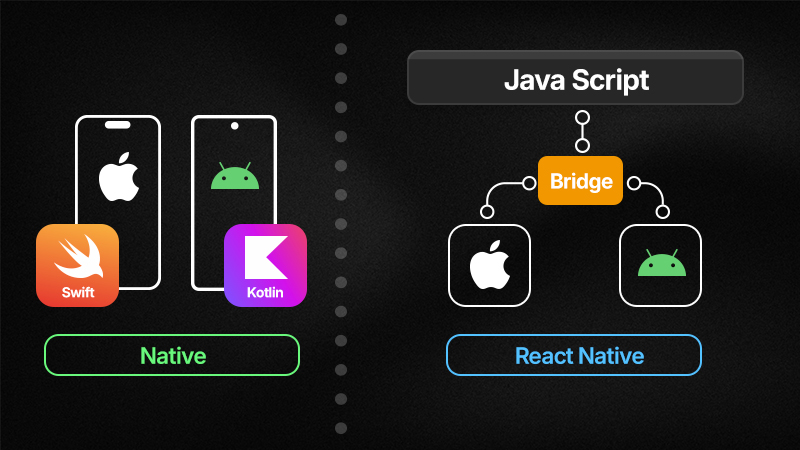
No technology middleware or browser is required to run native apps. Running a native app on iOS involves two primary languages. There’s the older, legacy Objective-C language and then the modern, streamlined Swift that works for iOS, macOS, watchOS, and tvOS.
Android uses mostly Java, a well-known programming language, and Kotlin, which was created in 2011 to address some of Java's design flaws.
Pros of Native Apps:
- Best performance for iOS/Android devices
- Best user experience
- Full hardware and device access
- Highest scalability
Cons of Native Apps:
- Two separate codebases for iOS and Android
- Higher development costs with traditional Dev Teams. Minimal cost with no code platforms like LastApp.
- Longer build timelines
Native app development is best when you’re focused on a better user experience or need higher-end performance. Many gaming, fintech, health-tracking, and real-time collaboration apps are built natively because they leverage device hardware and offline functionality, even in the background. You see this with apps like Instagram, Uber, and Apple Maps.
Web Apps
Web apps run in a mobile browser, such as Safari or Chrome. To most users, they may be designed to look and feel like native apps but function as websites designed for smaller mobile screens. That means the app runs remotely (cloud-based) rather than on the device itself. Although it can use some device features with permission access.
Technology:
The tech stack for web app development is much the same as website design and development. You typically use a combination of HTML, CSS, and JavaScript.
Pros of Web Apps:
- No need to mess with app store approvals
- Low development costs
- One codebase for all devices
- Instant deployment
Cons of Web Apps:
- You have limited or no device hardware access
- Slower performance than native apps
- There are no offline capabilities
- No home screen icon (by default)
What’s great about web-based apps is that they are quick, cheap, and fast to market. That’s why many startups or first-time founders test out ideas using web apps to validate a concept. Testing web-based vs. cloud-based solutions, or how the idea would translate to other app types, says a lot about how it will perform once fully built.
Web apps are best for content-heavy experiences, marketing tools, internal dashboards, and MVPs when the speed to launch is crucial. Twitter Lite (early web app version), Google Docs mobile, and many SaaS dashboards are good examples.
Hybrid Apps
As the name suggests, hybrid apps blend web app technologies with native app deployment. These are apps built with web stacks (HTML, CSS, JavaScript), wrapped in a native app shell so they can be distributed through app stores.
Technology:
Hybrid apps use a blend of tools, most commonly React Native, Flutter, Ionic, and/or Capacitor. A good understanding of basic web tools like HTML, CSS, and JavaScript helps. They run on both iOS and Android using a single codebase.
Pros of Hybrid Apps:
- One codebase for multiple platforms
- Faster development
- Lower costs than two native builds
- Reasonable hardware access
Cons of Hybrid Apps:
- Slight performance limitations compared to native apps
- Additional platform customization may be required
- UI differences can occasionally feel less polished
Hybrid apps are often where startups and founders who want iOS and Android capabilities begin. These are teams with limited budgets who need a faster solution than native apps but still prefer as much access to the hardware and distribution as possible. The most common examples are non-gaming apps where 60 fps is not a hard requirement, such as Facebook, Airbnb, and many fintech apps.
Progressive Web Apps (PWAs)
PWAs are sweeping through the development world like wildfire. These are web apps enhanced with modern browser APIs, so they behave like a native app. They can be installed via a web browser, but work offline and send push notifications.
Technology:
Most PWAs use web standards like Service Workers, the Web App Manifest, and HTTPS, as well as web frameworks like React, Vue, and Angular.
Pros of PWAs:
- No app store required
- Offline capabilities
- Installable from the browser
- SEO-friendly
- Fastest deployment option
- Installable without app store approval
Cons of PWAs:
- Limited iOS capabilities
- Restricted hardware access
- Lower discoverability without the app store
PWAs are highly effective for e-commerce stores, publishers, news media, and local businesses. You’ll find many TikTok influencers leaning into personalized PWAs, such as food bloggers building a recipe app or workout gurus building a daily health tracker.
Many businesses exploring composable apps begin with PWAs. Modern web architecture makes it much easier to add features later without rebuilding the entire app from scratch. Examples of PWAs include Starbucks, Trivago, and Pinterest.
How to Choose the Right Mobile App Type for Your Project
Choosing the right mobile application architecture for your idea is much easier when you work through a few questions first. That will help you choose what types of mobile apps will have the best return and engagement.
Q1: What is your budget & timeline?
How much time to live and how much you have to spend matters. That’s where a Platform like LastApp can help meet your specific needs. With a low entry point but producing highly quality apps to quickly prove your idea(s) or pivot to something else.
Q2: Do you need both iOS and Android?
Typically you can save a lot of time and money by choosing either native iOS or native Android. With LastApp, you don’t need to compromise since both Native Apps are generated with one click and use the same backend and feature set.
Q3: Does your app need offline functionality?
If you need your app to use hardware when users are not connected, you’re better off with native apps, hybrid solutions, or PWAs. Anything that doesn’t require offline functionality can go with a web app.
Q4: Do you need your app up and running ASAP?
Faster development is a big factor. If you have a traditional timeline, you can go with native apps or a hybrid solution. If you want your app launched quickly so you can fine-tune and start operating, you’ll want a no-code platform like LastApp.ai that allows you to build without coding experience.
Quick Comparison: Traditional vs no-code development for each app type
| App type | Traditional build | With LastApp.ai |
|---|---|---|
| Native iOS + Android | 4–6 months, $50K–$200K | Minutes to Days, from one prompt. Starting from $29.99 |
| Hybrid (React Native) | 2–4 months, $20K–$50K | Not Required |
| PWA | 2–6 weeks, $5K–$15K | Not Required |
| Web app | 1–4 weeks, $2K–$10K | Minutes to Days. Generated along with your Mobile Apps. |
Conclusion
The more you know about the four primary types of mobile apps, the better the framework for making smarter development decisions. Native, web, hybrid, and PWAs all have their advantages and disadvantages. It’s not about choosing the one with the most features or the latest tools, but about which aligns best with your target audience, development budget, overall timeline, and scale goals.
For first-time founders in the USA, a modern no-code app development platform often provides the fastest results with the least friction to launch. LastApp.ai turns ideas into launch-ready products without the complex coding or rough bottlenecks of traditional development. Start creating with LastApp.ai today and bring your idea to life as a fully functioning mobile application.